library(tidyverse)
library(knitr)

# 模拟一张用户属性表
set.seed(123)
raw_users <- tibble(
  user_id = 1:100,
  region = sample(c("华东", "华北", "华南", "西南"), 100, replace = TRUE),
  age = sample(c(18:70, NA), 100, replace = TRUE)
)3 优雅的处理数据
对于工程实践而言,我们需要一套既具备高可读性,又能应对大规模计算的数据处理流。本节我们将从数据处理的“语法”出发,探讨如何通过分箱技术让线性模型具备非线性表达能力,并最终使用 data.table 突破性能瓶颈。
3.1 数据处理的语法
传统的数据清洗往往伴随着大量嵌套的函数和临时变量,代码逻辑很难梳理清楚。Hadley Wickham 提出的 tidyverse 体系,其核心贡献在于确立了一套数据处理的语法(A Grammar for Data Wrangling)。它将数据操作抽象为一系列直观的动词组合:
- 选择(select):选取变量列
- 筛选(filter):筛选行,样本
- 变形(mutate):增加或者修改变量
- 汇总(summarize):一般和
group_by()连用,表示根据某一列做汇总。如果单独使用则是全局汇总。 - 排序(arrange):按照规则排序
通过引入原生管道符号 |>(或 magrittr 的 %>%),复杂的逻辑被顺畅地拆解为人类可读的数据流。构建统计分析/机器学习/深度学习前置的预处理流水线(Preprocessing Pipeline)。
tibble 是 tidyverse 对传统 data.frame 的现代化改进版本。它遵循 tidy data 理念,提供更一致、更可预测的行为:不会自动转换字符串为因子,不会在子集操作时自动降维,也不会因为列名冲突而悄悄修改变量类型。这种“类型稳定性”让数据处理过程更安全、更透明。
与 data.frame 相比,tibble 的打印方式更友好:默认只显示前几行,并对宽列进行截断,便于快速浏览数据结构而不刷屏。它还与 tidyverse 的 dplyr、tidyr、ggplot2 等包深度整合,成为整个 tidyverse 数据分析流程的基础数据结构。总体来说,tibble 强调可读性、稳定性和管道友好性,使数据处理代码更清晰、更易维护,是现代 R 数据分析的推荐默认格式。
我们将 raw_users 做一个简单的示例统计分析:
raw_users |>
  group_by(region) |>
  summarise(
    mean_age = mean(age, na.rm = TRUE),
    cnt = n()
  )
# A tibble: 4 × 3
region mean_age cnt
<chr> <dbl> <int>
1 华东 46.6 28
2 华北 46.5 26
3 华南 45.9 29
4 西南 39.7 17或者我们做一个交叉列联表:
result <- raw_users |>
  drop_na(age) |>
  filter(age >= 18) |>
  mutate(age_group = case_when(
    age < 30 ~ "年轻 (18-29)",
    age < 50 ~ "中年 (30-49)",
    TRUE ~ "资深 (50+)"
  )) |>
  group_by(region, age_group) |>
  summarise(
    cnt = n(),
    .groups = "drop"
  )
result
# A tibble: 12 × 3
region age_group cnt
<chr> <chr> <int>
1 华东 中年 (30-49) 12
2 华东 年轻 (18-29) 4
3 华东 资深 (50+) 10
4 华北 中年 (30-49) 10
5 华北 年轻 (18-29) 5
6 华北 资深 (50+) 11
7 华南 中年 (30-49) 15
8 华南 年轻 (18-29) 4
9 华南 资深 (50+) 10
10 西南 中年 (30-49) 6
11 西南 年轻 (18-29) 4
12 西南 资深 (50+) 5把长表(long)变为宽表(wide):
result |>
  pivot_wider(
    names_from = age_group,
    values_from = cnt,
    values_fill = 0   # 缺失填 0(可选)
  )
# A tibble: 4 × 4
region `中年 (30-49)` `年轻 (18-29)` `资深 (50+)`
<chr> <int> <int> <int>
1 华东 12 4 10
2 华北 10 5 11
3 华南 15 4 10
4 西南 6 4 53.2 连表操作
真实业务场景的数据通常散落在不同的数据库表中。tidyverse 提供了类似 SQL(Structured Query Language,结构化查询语言,用于管理关系型数据库的查询语言)的 Join 动词(如 left_join(), inner_join()),使得多表关联也能完美融入管道操作中,保持代码的连贯性。
# 模拟一张订单表
raw_orders <- tibble(
  user_id = sample(1:100, 150, replace = TRUE),
  amount = runif(150, 50, 2000)
)
模拟一个场景:用户信息同订单信息联合起来,汇总统计用户相关的信息:
result <- raw_users |>
  drop_na(age) |>
  filter(age >= 18) |>
  mutate(age_group = case_when(
    age < 30 ~ "年轻 (18-29)",
    age < 50 ~ "中年 (30-49)",
    TRUE ~ "资深 (50+)"
  )) |>
  left_join(raw_orders, by = "user_id") |>
  replace_na(list(amount = 0)) |>
  group_by(region, age_group) |>
  summarize(
    total_amount = sum(amount),
    avg_amount = mean(amount),
    n_users = n(),
    .groups = "drop"
  ) |>
  arrange(region, age_group) |>
  mutate(
    status = case_when(
      n_users > 20 ~ "Completed",
      n_users < 7 ~ "Delayed",
      TRUE ~ "In Progress"
    )
  )

library(gt)
library(gtExtras)
result |>
  gt() |>
  tab_options(
    table.font.size = gt::px(14)
)| region | age_group | total_amount | avg_amount | n_users | status |
|---|---|---|---|---|---|
| 华东 | 中年 (30-49) | 16674.330 | 757.9241 | 22 | Completed |
| 华东 | 年轻 (18-29) | 4412.615 | 630.3735 | 7 | In Progress |
| 华东 | 资深 (50+) | 18954.548 | 997.6078 | 19 | In Progress |
| 华北 | 中年 (30-49) | 17855.603 | 939.7686 | 19 | In Progress |
| 华北 | 年轻 (18-29) | 5594.903 | 799.2719 | 7 | In Progress |
| 华北 | 资深 (50+) | 15444.079 | 812.8463 | 19 | In Progress |
| 华南 | 中年 (30-49) | 11196.559 | 533.1695 | 21 | Completed |
| 华南 | 年轻 (18-29) | 10215.918 | 1276.9898 | 8 | In Progress |
| 华南 | 资深 (50+) | 19029.024 | 1001.5276 | 19 | In Progress |
| 西南 | 中年 (30-49) | 6481.338 | 648.1338 | 10 | In Progress |
| 西南 | 年轻 (18-29) | 3984.428 | 664.0713 | 6 | Delayed |
| 西南 | 资深 (50+) | 12097.703 | 1099.7912 | 11 | In Progress |
使用 gt 包将该表格重构为符合大众阅读习惯的样式(如 ESPN 表格样式):
result_table <- result |>
  gt(groupname_col = "region", id = "sales_report") |>
  gt_theme_espn() |>

  tab_header(
    title = md("**区域用户消费行为深度透视**"),
    subtitle = md("*基于年龄分层的订单贡献度及进度追踪*")
  ) |>

  cols_label(
    age_group = "年龄画像",
    total_amount = "消费总额 (趋势图)",
    avg_amount = "人均消费",
    n_users = "覆盖人数",
    status = "当前状态" # 【新增】标签映射
  ) |>

  fmt_currency(
    columns = avg_amount,
    currency = "CNY",
    decimals = 1
  ) |>

  gt_plt_bar_pct(
    column = total_amount,
    fill = "#1498db",
    background = "#e5e5e5",
    scaled = FALSE,
    labels = TRUE,
    decimals = 1,
    label_cutoff = 0
  ) |>
  # 1. Completed 状态:浅绿背景 + 深绿加粗字体
  tab_style(
    style = cell_fill(color = "#e6fffa"),
    locations = cells_body(columns = status, rows = status == "Completed")
  ) |>
  tab_style(
    style = cell_text(color = "#38a169", weight = "bold"),
    locations = cells_body(columns = status, rows = status == "Completed")
  ) |>
  # 2. Delayed 状态:红色加粗字体
  tab_style(
    style = cell_text(color = "#e53e3e", weight = "bold"),
    locations = cells_body(columns = status, rows = status == "Delayed")
  ) |>
  # 3. In Progress 状态:橙黄色加粗字体 (补充设计,保持视觉平衡)
  tab_style(
    style = cell_text(color = "#d69e2e", weight = "bold"),
    locations = cells_body(columns = status, rows = status == "In Progress")
  ) |>

  tab_style(
    style = cell_text(weight = "bold", color = "#2c3e50", size = px(14)),
    locations = cells_row_groups()
  ) |>

  tab_style(
    style = gt::cell_text(size = gt::px(14)),
    locations = gt::cells_body()
  ) |>

  gt_color_rows(
    columns = avg_amount,
    palette = "Greens",
    alpha = 0.5,
    domain = range(result$avg_amount)
  ) |>

  # 将 n_users 和 status 列都居中对齐,排版更整洁
  cols_align(align = "center", columns = c(n_users, status)) |>

  tab_options(
    table.width = px(550), # 稍微加宽表格以容纳新列
    data_row.padding = px(3),
    heading.align = "left",
    table.border.top.style = "none"
  ) |>

  tab_source_note(
    source_note = md("*注:消费总额趋势条根据各区域最大值自动缩放*")
  )

result_table| 区域用户消费行为深度透视 | ||||
| 基于年龄分层的订单贡献度及进度追踪 | ||||
| 年龄画像 | 消费总额 (趋势图) | 人均消费 | 覆盖人数 | 当前状态 |
|---|---|---|---|---|
| 华东 | ||||
| 中年 (30-49) |
87.6%
|
¥757.9 | 22 | Completed |
| 年轻 (18-29) |
23.2%
|
¥630.4 | 7 | In Progress |
| 资深 (50+) |
99.6%
|
¥997.6 | 19 | In Progress |
| 华北 | ||||
| 中年 (30-49) |
93.8%
|
¥939.8 | 19 | In Progress |
| 年轻 (18-29) |
29.4%
|
¥799.3 | 7 | In Progress |
| 资深 (50+) |
81.2%
|
¥812.8 | 19 | In Progress |
| 华南 | ||||
| 中年 (30-49) |
58.8%
|
¥533.2 | 21 | Completed |
| 年轻 (18-29) |
53.7%
|
¥1,277.0 | 8 | In Progress |
| 资深 (50+) |
100%
|
¥1,001.5 | 19 | In Progress |
| 西南 | ||||
| 中年 (30-49) |
34.1%
|
¥648.1 | 10 | In Progress |
| 年轻 (18-29) |
20.9%
|
¥664.1 | 6 | Delayed |
| 资深 (50+) |
63.6%
|
¥1,099.8 | 11 | In Progress |
| 注:消费总额趋势条根据各区域最大值自动缩放 | ||||
3.3 快速数据分析
skimr 是一个非常强大且受欢迎的 R 包,主要用于探索性数据分析 (EDA)。它的核心功能是快速生成数据框 (Data Frame) 的摘要统计信息,通常被 R 语言使用者视为基础包中 summary() 函数的“超级升级版”。
- 它能在 R 控制台 (Console) 中直接打印出微型直方图(针对数值型变量)和微型条形图。可以直接观察数据的分布偏态。
- 自动将变量按类型(如:数值型 numeric、字符型 character、因子 factor、逻辑型 logical、日期型 Date 等)分类显示。
- 清晰地列出每个变量的缺失值数量 (n_missing) 以及数据的完整率 (complete_rate),方便在建模前处理空值。
- 可以无缝使用 dplyr 的管道符 (
%>%或|>)、group_by()和filter()等函数对统计结果进行二次操作。
# 加载所需的 EDA 包 (如果没有请先 install.packages)
library(tidymodels)
library(tidyverse)
library(torch)
library(skimr)
data(ames)
# 所有的 EDA 都应该只在训练集上做,防止数据泄露(Data Leakage)!
set.seed(123)
torch_manual_seed(123)
ames_split <- initial_split(ames, prop = 0.80)
ames_train <- training(ames_split)

# 1. 极速扫描全表 (看一眼控制台输出,极其惊艳)
ames_train %>%
  skim_without_charts() %>%
  # 直接剔除指定的列
select(-n_missing, -complete_rate)| Name | Piped data |
| Number of rows | 2344 |
| Number of columns | 74 |
| _______________________ | |
| Column type frequency: | |
| factor | 40 |
| numeric | 34 |
| ________________________ | |
| Group variables | None |
Variable type: factor
| skim_variable | ordered | n_unique | top_counts |
|---|---|---|---|
| MS_SubClass | FALSE | 16 | One: 851, Two: 455, One: 226, One: 158 |
| MS_Zoning | FALSE | 7 | Res: 1813, Res: 376, Flo: 109, Res: 22 |
| Street | FALSE | 2 | Pav: 2334, Grv: 10 |
| Alley | FALSE | 3 | No_: 2188, Gra: 92, Pav: 64 |
| Lot_Shape | FALSE | 4 | Reg: 1479, Sli: 789, Mod: 63, Irr: 13 |
| Land_Contour | FALSE | 4 | Lvl: 2112, HLS: 98, Bnk: 87, Low: 47 |
| Utilities | FALSE | 3 | All: 2341, NoS: 2, NoS: 1 |
| Lot_Config | FALSE | 5 | Ins: 1706, Cor: 426, Cul: 140, FR2: 61 |
| Land_Slope | FALSE | 3 | Gtl: 2227, Mod: 104, Sev: 13 |
| Neighborhood | FALSE | 28 | Nor: 362, Col: 224, Old: 196, Edw: 160 |
| Condition_1 | FALSE | 9 | Nor: 2012, Fee: 125, Art: 76, RRA: 44 |
| Condition_2 | FALSE | 8 | Nor: 2319, Fee: 11, Art: 4, Pos: 3 |
| Bldg_Type | FALSE | 5 | One: 1924, Twn: 190, Dup: 95, Twn: 82 |
| House_Style | FALSE | 8 | One: 1193, Two: 687, One: 250, SLv: 106 |
| Overall_Cond | FALSE | 9 | Ave: 1339, Abo: 427, Goo: 298, Ver: 107 |
| Roof_Style | FALSE | 6 | Gab: 1853, Hip: 443, Gam: 19, Fla: 16 |
| Roof_Matl | FALSE | 7 | Com: 2310, Tar: 19, WdS: 7, WdS: 5 |
| Exterior_1st | FALSE | 16 | Vin: 805, Met: 365, HdB: 362, Wd : 329 |
| Exterior_2nd | FALSE | 17 | Vin: 793, Met: 363, HdB: 336, Wd : 316 |
| Mas_Vnr_Type | FALSE | 5 | Non: 1420, Brk: 701, Sto: 199, Brk: 23 |
| Exter_Cond | FALSE | 5 | Typ: 2043, Goo: 232, Fai: 59, Exc: 7 |
| Foundation | FALSE | 6 | PCo: 1027, CBl: 1012, Brk: 252, Sla: 41 |
| Bsmt_Cond | FALSE | 6 | Typ: 2090, Goo: 99, Fai: 81, No_: 69 |
| Bsmt_Exposure | FALSE | 5 | No: 1531, Av: 331, Gd: 226, Mn: 184 |
| BsmtFin_Type_1 | FALSE | 7 | Unf: 684, GLQ: 683, ALQ: 341, Rec: 218 |
| BsmtFin_Type_2 | FALSE | 7 | Unf: 1993, Rec: 83, LwQ: 74, No_: 70 |
| Heating | FALSE | 6 | Gas: 2306, Gas: 22, Gra: 8, Wal: 5 |
| Heating_QC | FALSE | 5 | Exc: 1175, Typ: 707, Goo: 383, Fai: 76 |
| Central_Air | FALSE | 2 | Y: 2176, N: 168 |
| Electrical | FALSE | 6 | SBr: 2146, Fus: 147, Fus: 41, Fus: 8 |
| Functional | FALSE | 8 | Typ: 2181, Min: 54, Min: 52, Mod: 30 |
| Garage_Type | FALSE | 7 | Att: 1380, Det: 635, Bui: 135, No_: 130 |
| Garage_Finish | FALSE | 4 | Unf: 987, RFn: 639, Fin: 586, No_: 132 |
| Garage_Cond | FALSE | 6 | Typ: 2121, No_: 132, Fai: 64, Poo: 13 |
| Paved_Drive | FALSE | 3 | Pav: 2116, Dir: 176, Par: 52 |
| Pool_QC | FALSE | 5 | No_: 2335, Exc: 3, Goo: 3, Typ: 2 |
| Fence | FALSE | 5 | No_: 1880, Min: 275, Goo: 91, Goo: 88 |
| Misc_Feature | FALSE | 6 | Non: 2254, She: 81, Gar: 4, Oth: 3 |
| Sale_Type | FALSE | 10 | WD : 2032, New: 185, COD: 74, Con: 20 |
| Sale_Condition | FALSE | 6 | Nor: 1937, Par: 188, Abn: 158, Fam: 34 |
Variable type: numeric
| skim_variable | mean | sd | p0 | p25 | p50 | p75 | p100 |
|---|---|---|---|---|---|---|---|
| Lot_Frontage | 57.58 | 33.17 | 0.00 | 43.00 | 63.00 | 78.00 | 313.00 |
| Lot_Area | 10124.68 | 8302.84 | 1300.00 | 7347.50 | 9350.00 | 11553.75 | 215245.00 |
| Year_Built | 1971.25 | 30.09 | 1872.00 | 1954.00 | 1973.00 | 2000.00 | 2010.00 |
| Year_Remod_Add | 1983.91 | 20.91 | 1950.00 | 1965.00 | 1992.00 | 2004.00 | 2010.00 |
| Mas_Vnr_Area | 100.78 | 179.29 | 0.00 | 0.00 | 0.00 | 162.00 | 1600.00 |
| BsmtFin_SF_1 | 4.18 | 2.23 | 0.00 | 3.00 | 3.00 | 7.00 | 7.00 |
| BsmtFin_SF_2 | 49.88 | 169.34 | 0.00 | 0.00 | 0.00 | 0.00 | 1474.00 |
| Bsmt_Unf_SF | 553.34 | 438.68 | 0.00 | 216.00 | 460.50 | 789.00 | 2336.00 |
| Total_Bsmt_SF | 1045.02 | 445.63 | 0.00 | 784.00 | 988.00 | 1286.50 | 6110.00 |
| First_Flr_SF | 1153.53 | 393.78 | 334.00 | 872.75 | 1078.50 | 1373.25 | 5095.00 |
| Second_Flr_SF | 330.15 | 427.04 | 0.00 | 0.00 | 0.00 | 700.25 | 2065.00 |
| Gr_Liv_Area | 1488.75 | 508.52 | 334.00 | 1109.75 | 1432.00 | 1734.50 | 5642.00 |
| Bsmt_Full_Bath | 0.43 | 0.53 | 0.00 | 0.00 | 0.00 | 1.00 | 3.00 |
| Bsmt_Half_Bath | 0.06 | 0.25 | 0.00 | 0.00 | 0.00 | 0.00 | 2.00 |
| Full_Bath | 1.56 | 0.55 | 0.00 | 1.00 | 2.00 | 2.00 | 4.00 |
| Half_Bath | 0.37 | 0.50 | 0.00 | 0.00 | 0.00 | 1.00 | 2.00 |
| Bedroom_AbvGr | 2.84 | 0.82 | 0.00 | 2.00 | 3.00 | 3.00 | 6.00 |
| Kitchen_AbvGr | 1.05 | 0.22 | 0.00 | 1.00 | 1.00 | 1.00 | 3.00 |
| TotRms_AbvGrd | 6.41 | 1.57 | 2.00 | 5.00 | 6.00 | 7.00 | 15.00 |
| Fireplaces | 0.58 | 0.65 | 0.00 | 0.00 | 1.00 | 1.00 | 4.00 |
| Garage_Cars | 1.76 | 0.76 | 0.00 | 1.00 | 2.00 | 2.00 | 5.00 |
| Garage_Area | 471.85 | 216.38 | 0.00 | 315.75 | 480.00 | 576.00 | 1418.00 |
| Wood_Deck_SF | 93.07 | 128.63 | 0.00 | 0.00 | 0.00 | 168.00 | 1424.00 |
| Open_Porch_SF | 46.34 | 65.48 | 0.00 | 0.00 | 25.00 | 70.00 | 547.00 |
| Enclosed_Porch | 21.98 | 60.06 | 0.00 | 0.00 | 0.00 | 0.00 | 584.00 |
| Three_season_porch | 2.50 | 24.17 | 0.00 | 0.00 | 0.00 | 0.00 | 508.00 |
| Screen_Porch | 16.26 | 55.81 | 0.00 | 0.00 | 0.00 | 0.00 | 480.00 |
| Pool_Area | 2.00 | 34.05 | 0.00 | 0.00 | 0.00 | 0.00 | 800.00 |
| Misc_Val | 52.36 | 571.44 | 0.00 | 0.00 | 0.00 | 0.00 | 17000.00 |
| Mo_Sold | 6.23 | 2.71 | 1.00 | 4.00 | 6.00 | 8.00 | 12.00 |
| Year_Sold | 2007.79 | 1.32 | 2006.00 | 2007.00 | 2008.00 | 2009.00 | 2010.00 |
| Sale_Price | 178985.66 | 80509.79 | 12789.00 | 128000.00 | 159000.00 | 211000.00 | 755000.00 |
| Longitude | -93.64 | 0.03 | -93.69 | -93.66 | -93.64 | -93.62 | -93.59 |
| Latitude | 42.03 | 0.02 | 41.99 | 42.02 | 42.03 | 42.05 | 42.06 |
还有一个可以快速做自动化探索性数据分析的的包叫做DataExplorer。
在面对一个完全陌生的新数据集时,写代码逐个变量画图会耗费大量时间。这个包旨在通过极简的代码(通常只有一行),瞬间为你生成海量高质量的统计图表,甚至是一份完整的 HTML 数据诊断报告。
- 它能自动扫描数据集的结构、缺失值、分布和相关性,并打包输出为一个交互式的 HTML 报告。
- 提供了一系列以
plot_开头的函数,涵盖了数据科学中 80% 以上的常规可视化需求。 - 在进行机器学习建模前,你可以指定一个“目标变量”(Y值),
DataExplorer会自动分析其他所有特征(X值)与这个目标变量的关系。 - 它的底层绘图逻辑基于
ggplot2,且处理速度优化得很好,同时支持离散型和连续型数据的自动化分类处理。
# 图形未绘制,请同学们自行运行代码
library(DataExplorer) # 批量绘图神器
plot_intro(ames_train)     # 整体结构图:多少连续变量、多少离散变量、多少缺失行
# plot_missing(ames_train)   # 缺失值排行榜(决定哪些列该丢弃,哪些该插补)
# Feature Distributions
# 1. 批量查看所有【连续变量】的分布
plot_histogram(ames_train, nrow = 3L, ncol = 3L)

# 2. 批量查看所有【分类变量】的频数
# 哪些类别的长条极短?需要 step_other(threshold = 0.01) 把它们合并为 "other"
plot_bar(
  ames_train,
  nrow = 3L,
  ncol = 3L,
  theme_config = list(
    axis.text.y = element_blank(),  # 隐藏 Y 轴文字
    axis.ticks.y = element_blank()  # 顺便隐藏 Y 轴的刻度线,更干净
  )
)
3.4 连续型数据离散化
观察数据情况,会发现一个问题。像全卫数量 (Full_Bath)、半卫数量 (Half_Bath)、车库可停车辆数 (Garage_Cars) 甚至整体质量评分 (Overall_Qual),它们在数据字典中确实用数字记录,但它们本质上是离散的分类变量(或有序因子),而不是连续的数值。如果直接放进回归模型里,模型会误以为 2 个浴室是 1 个浴室的绝对两倍,这可能会扭曲业务逻辑。
将这些变量转化为因子类型,并切分数据为 train 和 test:
ames_clean <- ames %>%
  mutate(
    across(
      # 条件:是数值型,且唯一值的数量 <= 10(可以根据需要调整这个阈值)
      where(~ is.numeric(.x) && n_distinct(.x) <= 10),
      as.factor
    )
  )
ames_split <- initial_split(ames_clean, prop = 0.80)
ames_train <- training(ames_split)
ames_test <- testing(ames_split)
再考虑一种情况:
library(partykit)
ct_demo <- ctree(
  log(Sale_Price) ~ Lot_Frontage,
  data = ames_clean,
  control = ctree_control(
    maxdepth = 3,        # 限制树深度
    minbucket = 20       # 每个叶节点最少样本数
  )
)
plot(ct_demo,
    tp_args = list(      # 截断箱线图的上下 1%,专注显示核心分布区间
    yscale = quantile(log(ames_clean$Sale_Price), c(0.01, 0.99)),
    cex = 0
  ))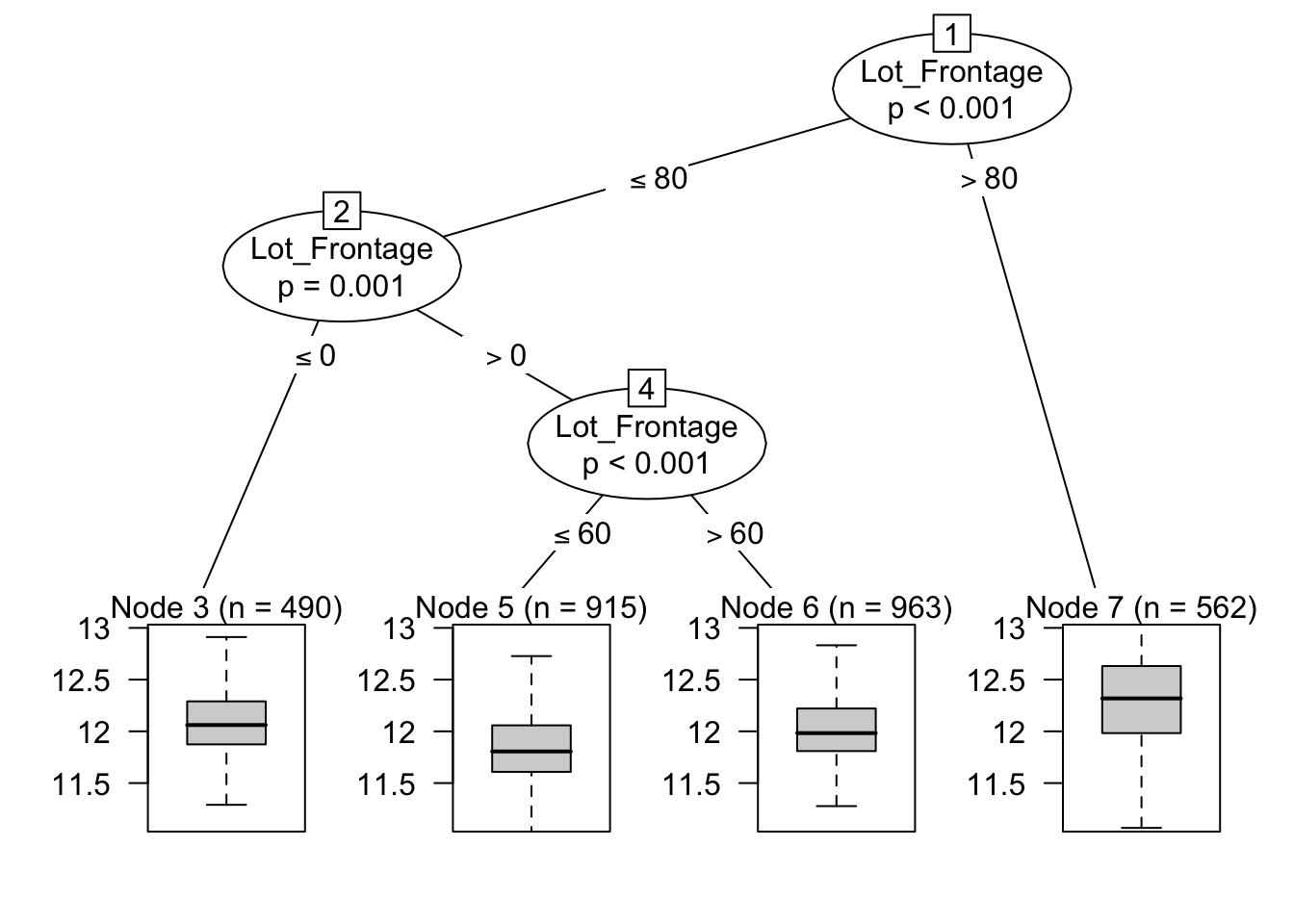
针对于 Lot_Frontage 这个变量,我们将其按照上图分段,对于 outcomes 的预测会更好。
基于此想法,我们引入连续型变量离散化的做法(注意不是均匀分段,而是基于树模型):
library(tidymodels)
library(embed)
rec <- recipe(Sale_Price ~ ., data = ames_train) %>%
  step_rm(matches("Id|Longitude|Latitude")) %>%
  step_other(all_nominal_predictors(), threshold = 0.01) %>%
  step_nzv(all_predictors()) %>%
#  step_log(Gr_Liv_Area, Lot_Area, base = 10) %>%
  # bins 处理
  step_mutate(
    across(c(where(is.numeric), -Sale_Price), ~ ., .names = "{.col}_bin")) %>%
  step_discretize_cart(
      ends_with("_bin"),
      outcome = "Sale_Price",
      tree_depth = 3,
      cost_complexity = 0.001
  ) %>%
  # step_rm(where(is.numeric)) %>%   # 本条为错误表达,正确的是下一条。
  step_rm(all_numeric_predictors()) %>%
  # 此时 ends_with("_bin") 里面全都是成功分段的 factor 了
  step_dummy(all_nominal_predictors(), one_hot = TRUE) %>%
  # 接着常规操作
  step_nzv(all_predictors()) %>%
  step_normalize(all_outcomes()) %>%
  step_normalize(all_predictors())


# 重新训练并应用
prep_rec <- prep(rec)
train_df <- bake(prep_rec, new_data = NULL)
test_df  <- bake(prep_rec, new_data = ames_test)

ncol(train_df)      # 查看维度,包括 outcomes
[1] 180names(train_df) |> # 打印部分变量
keep(str_detect, "Sale_Condition|Lot_Frontage_bin")[1] "Sale_Condition_Abnorml" "Sale_Condition_Normal"
[3] "Sale_Condition_Partial" "Lot_Frontage_bin_X..Inf.10.5."
[5] "Lot_Frontage_bin_X.10.5.71.5." "Lot_Frontage_bin_X.71.5.81.5."
[7] "Lot_Frontage_bin_X.81.5.90.5." "Lot_Frontage_bin_X.90.5.118.5."最后使用弹性网来预测:
x_train <- torch_tensor(
  as.matrix(train_df %>% select(-Sale_Price)), dtype = torch_float())
y_train <- torch_tensor(
  matrix(train_df$Sale_Price, ncol=1), dtype = torch_float())

x_test <- torch_tensor(
  as.matrix(test_df %>% select(-Sale_Price)), dtype = torch_float())
y_test <- torch_tensor(
  matrix(test_df$Sale_Price, ncol=1), dtype = torch_float())

model <- nn_sequential(
  nn_linear(ncol(x_train), 128), # 输入特征 -> 128个神经元
  nn_relu(),                     # 激活函数
  nn_linear(128, 64),            # 128 -> 64
  nn_relu(),                     # 激活函数
  nn_linear(64, 1)               # 64 -> 输出1个预测值
)
learning_rate <- 0.0025
optimizer <- optim_adam(model$parameters, lr = learning_rate)
loss_fn <- nn_mse_loss()   # 初始化后使用

n_in <- ncol(x_train)
feature_names <- colnames(train_df %>% select(-Sale_Price))

w <- (torch_randn(n_in, 1) * 0.1)$requires_grad_(TRUE)
b <- torch_zeros(1, requires_grad = TRUE)

lambda <- 0.5
alpha <- 0.95
learning_rate <- 0.002
optimizer <- optim_adam(list(w, b), lr = learning_rate)

# 5. 带有软阈值的训练循环
epochs <- 1000
train_losses <- numeric(epochs)
w_history <- matrix(NA, nrow = epochs, ncol = n_in)
colnames(w_history) <- feature_names

for (t in 1:epochs) {
  optimizer$zero_grad()

  y_pred <- torch_mm(x_train, w) + b # 向前传播

  mse_loss <- loss_fn(y_pred, y_train)
  l2_penalty <- torch_square(w)$sum()
  loss <- mse_loss + lambda * (1 - alpha) * 0.5 * l2_penalty # 计算 loss

  # 梯度反向传播并走一步
  loss$backward()
  optimizer$step()

  # 近端梯度下降 (Proximal Step) 截断 L1 惩罚
  with_no_grad({
    # 计算截断阈值 (学习率 * 惩罚力度 * L1比例)
    tau <- learning_rate * lambda * alpha

    # 应用软阈值公式进行截断,强行抹零微小权重
    w_new <- torch_sign(w) * torch_relu(torch_abs(w) - tau)
    w$copy_(w_new) # 就地更新权重
  })

  # E. 记录指标
  train_losses[t] <- loss$item()
  w_history[t, ] <- as.numeric(w$detach())

  if (t %% 100 == 0) cat(sprintf("Epoch %d: Loss = %.4f\n", t, loss$item()))
}
Epoch 100: Loss = 0.2153
Epoch 200: Loss = 0.1956
Epoch 300: Loss = 0.1837
Epoch 400: Loss = 0.1758
Epoch 500: Loss = 0.1701
Epoch 600: Loss = 0.1656
Epoch 700: Loss = 0.1620
Epoch 800: Loss = 0.1589
Epoch 900: Loss = 0.1561
Epoch 1000: Loss = 0.1537final_w <- abs(w_history[epochs, ])
with_no_grad({
preds_nn <- torch_mm(x_test, w) + b
rmse_nn <- as.numeric(torch_sqrt(torch_mean(torch_square(preds_nn - y_test))))
})
cat(sprintf("Elastic Net RMSE: %.4f\n", rmse_nn))Elastic Net RMSE: 0.3736cat(sprintf("初始特征总数: %d\n", n_in))初始特征总数: 179cat(sprintf("被完全清零的特征数: %d\n", sum(final_w == 0)))被完全清零的特征数: 54cat(sprintf("最终保留的特征数: %d\n", sum(final_w != 0)))最终保留的特征数: 125